Accepted Forms of Online Payment
As of Jan. 16, 2024, we will no longer accept non-Canadian debit or credit cards for online Compass payment and AutoLoad enrollment. Accepted credit cards for these payments include American Express, Mastercard, Debit Mastercard, Visa, and Visa Debit issued by Canadian financial institutions.
To update your payment methods, please sign in to your account at compasscard.ca.
Donate Your Compass Card
You can donate your unwanted Compass Card or Ticket at YVR–Airport Station. We will convert any remaining value on the card into transit passes that help children, families, and seniors at United Way.
Forms and Information
Bulk Orders for Transit Fares
Planning transit for a group doesn’t need to be complicated. Whether you’re organising a school trip, supporting a non-profit, or distributing passes, TransLink makes it easy to purchase fares in advance.
Ordering Bulk Tickets
Download the bulk ticket order form here to get started.
Submit your completed form by email to bulk.orders@translink.ca, or mail it with payment to:
TransLink Customer Service Centre
#54 – 601 W. Cordova St
Vancouver, B.C. V6B 1G1
To avoid delays, send both your order form and payment at the same time.
Payment Options
We accept:
EFT (include reference information)
Bank or credit union cheque
Bank draft (payable to TransLink)
We don’t accept credit card payments online or by phone. Credit card payments are accepted in person.
Delivery
We ship orders by courier to business addresses within Metro Vancouver at no extra cost.
For delivery outside Metro Vancouver, arrange your own courier pick-up and delivery once your order is ready.Please Include any delivery instructions (such as phone or buzzer number, or business hours) in the delivery notes section.
In-Person Purchases
You can purchase small quantities of bulk tickets in person at the TransLink Customer Service Centre at Waterfront Station. Call ahead to ensure your order is ready.
Processing Times
Allow up to 10 days for processing. If you need your order sooner, email bulk.orders@translink.ca or call 604.953.3333 and ask for the bulk order team.
Important Information for Bulk Orders
All Compass tickets are non-refundable and non-exchangeable. Compass tickets expire after 254 days, please check your expiration dates before use. The expiration date is shown on the enclosed reciept and label on the box. Please ensure the expiration date is retained for your records and your inventory is managed on a First-In, First-Out basis.
Children aged 12 and under travel free on TransLink services. Learn more on the Fare Pricing and Zones page.
Lost or Stolen Cards
To replace lost or stolen Compass Cards, visit our Lost and Found page.
Receipts and Transactions
Use the instructions below to find your Compass receipts and transaction history, based on the method of purchase.
Receipts for Online or Phone Purchases
Stored Value and Passes
View receipts for Stored Value and pass purchases by logging into compasscard.ca and clicking on "view card usage" under the My Cards tab.
Receipts are also sent to the email address associated with your account.
Stored Value and Monthly Passes (AutoLoad)
Download transaction history for Stored Value and Monthly Pass AutoLoads by logging into compasscard.ca and selecting "My Cards" and then "Card Usage." Choose "Sales transaction" to filter your transaction history.
Note that only the dollar amount for Stored Value purchases will be displayed; Monthly Passes will show up as a $0 value.
Visit the Monthly Pass or West Coast Express fare pages for monthly pass fare pricing.
Receipts will be sent to the email address associated with your account.
Receipts for CVM or Compass Customer Service Centre Purchases
At CVMs, please select the receipt option at the end of your transaction and retain your receipts.
For purchases made at the TransLink Customer Service Centre, please retain the receipt provided to you by the customer-service clerk.
You can also view and download a history of the types of products loaded and purchased to your card by logging into compasscard.ca and selecting "My Cards" and then "Card Usage." Choose "Sales transaction" to filter your history. You'll see the types of products you've loaded, but only Stored Value amounts will appear; passes will show up as a $0 value.
Visit the Monthly Pass or West Coast Express fare pages for monthly pass fare pricing.
Difference between Sales Transactions and Usage Transactions
Sales transactions show the types of products loaded to the card.
Usage transactions show your taps in and out, along with the amount deducted if paying for your trips with Stored Value.
Refund Policy
If you’re looking to return your Compass Card, bring the card to the TransLink Customer Service Centre at Waterfront Station. We’ll reimburse your $6 deposit and any remaining balance (or your deposit minus any negative balance). You can also mail your Compass Card along with a refund form to:
Compass Customer Service
PO Box 2212 STN Terminal
Vancouver BC, V6B 3W2
Please note, there are no deposit refunds for "Initial Release" or "No Deposit" Compass Cards or on most program cards.
When requesting a refund, please remember:
-
Most refunds are issued by cheque, which is mailed to the registered account holder. No refunds will be issued via electronic funds transfer.
-
TransLink reserves the right to restrict the number of refunds for Stored Value, Monthly Passes, and DayPasses to any individual in any calendar year.
-
Refunds will only be issued in Canadian dollars.
-
Refunds cannot be issued where the card is registered to a different person other than the person requesting the refund.
How to Request a Refund
Requests for refunds can be made the following ways:
Stored Value and Passes
Stored Value is refundable only if your Compass Card is registered. Requests for Stored Value refunds must be made within two years of the last tap in or tap out.
Monthly Passes and DayPasses are refundable to registered cardholders, as long as the pass hasn’t been used for travel. Requests for refunds of Monthly Passes and DayPasses must be made within 60 days of the pass purchase date.
Compass Card Deposit
The $6 deposit, minus any insufficient fare (e.g., negative balance), is refundable when you return your Compass Card to TransLink either in person or by mail along with a completed refund form.
There are no deposit refunds for "Initial Release" or "No Deposit" Compass Cards and most program cards.
Visitors from outside of Canada
If you’re visiting from outside the country and would like a refund for any unused transit fare product or Compass Card deposit, we encourage you to visit us in person at a location listed above to obtain a refund.
You may also return your Compass Card to us by mail, along with a completed refund request form, but please note the refund polices outlined above.
Converting FareSavers to Stored Value
If you have leftover FareSavers, you can keep using them on the bus or convert them to Stored Value on a Compass Card. To convert FareSavers to Stored Value on a Compass Card, visit the TransLink Customer Service Centre at Waterfront Station. The amount that is converted is the amount that was paid for the FareSavers, not the face value of the tickets. For instance, if the book of FareSavers cost you $21, the conversation is based on $2.10 per ticket.
Please note that FareSavers distributed at no cost as part of a program can only be converted to Compass Tickets.
Compass Vending Machine Errors
If a Compass Vending Machine (CVM) issues a receipt indicating that an amount to be refunded was not returned, a product was not dispensed, or another error occurred, a refund will be issued upon presentation of the receipt.
If no receipt is issued by the CVM, the request for a refund must include:
-
The station name where the malfunction occurred.
-
The five-digit CVM number (located on the front of the CVM).
-
The amount, date, and approximate time of the attempted transaction.
TransLink will verify the error and once the error is verified, will issue a refund, in-kind fare product, or adjust the Stored Value balance on a Compass Card.
Requests related to a CVM errors must be made within 60 days of the error.
Requests for refunds must be made by submitting the above-noted information to Compass Customer Service or submitted in person at TransLink Customer Service Centre at Waterfront Station.
Caring for your Compass Card
Your Compass Card has a chip and antenna inside, so please don’t puncture or bend your card. Always remove your Compass Card from your wallet when you tap, as other cards may cause interference.
Compass Terms and Conditions
Compass Card Terms and Conditions
Compass Ticket Terms and Conditions
Compass for HandyDART
Enjoy an improved transit experience with Compass Card, the reloadable farecard that works everywhere on transit in Metro Vancouver.
Learn more about Compass for HandyDART
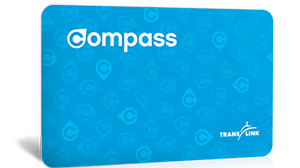
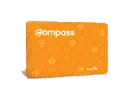 Some passengers are eligible for concession fares, and can purchase an orange Concession Compass Card at the TransLink Customer Service Centre at Waterfront Station,
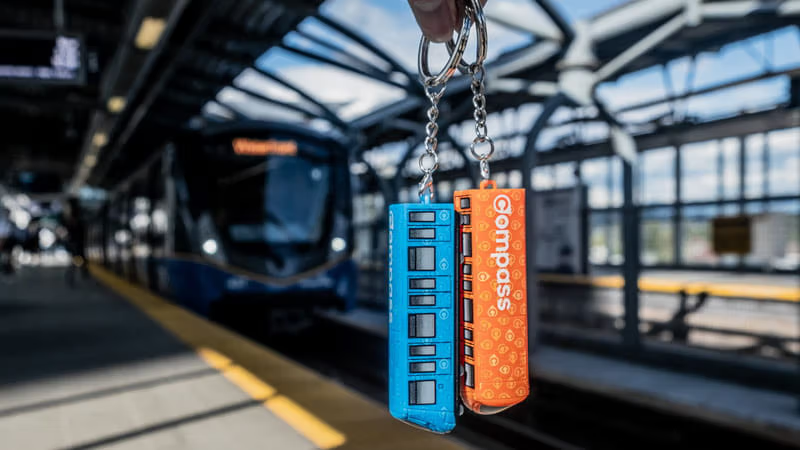
 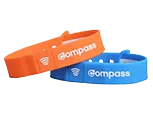 Compass Wearables work the same as a Compass Card—tap in and out when travelling on transit.